MySSS Card Philippines : Social Security System (SSS)
Organization : Republic of the Philippines
Portal : Social Security System (SSS)
Facility : MySSS Card
Country : Philippines
Website : https://www.sss.gov.ph/mysss-card/
| Want to comment on this post? Go to bottom of this page. |
|---|
What is MySSS Card?
The MySSS Card is the new official functional ID issued by SSS. Equipped with an EMV chip, it replaces the old UMID card. Members may obtain the MySSS Card from an SSS partner bank after completing identity verification using the National ID eVerify system and opening a bank account with the said partner bank.
Related / Similar Facility : SSS Sickness Benefit Philippines
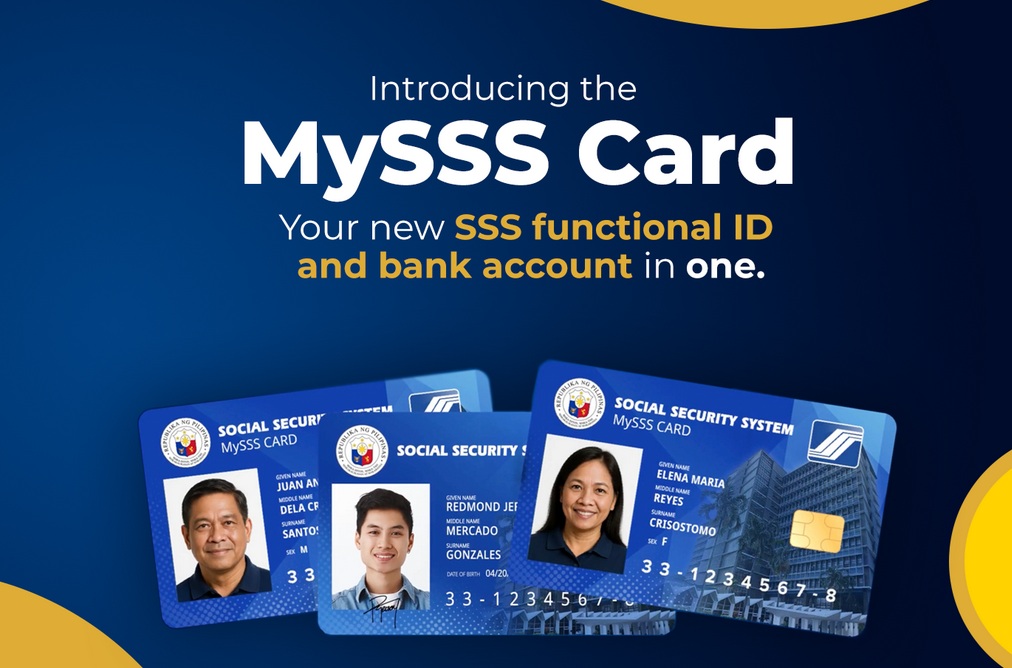
Features of MySSS Card
Easy Banking:
You can open a bank account and automatically link it to your SSS for receiving benefits, loans, and other proceeds. You won’t need to do a separate enrollment under the Disbursement Account Enrollment Module (DAEM).
Strong Security:
Biometric verification with your National ID helps prevent fraud.
Convenient Payments:
The MySSS Card can be used for payments at physical and online stores.
Eligibility of MySSS Card
Members, prior registrants, pensioners, individual claimants and representative payees may apply for the MySSS Card, provided they meet the following requirements:
** You must have SS number tagged as “permanent”.
** You must be registered on the My.SSS Portal.
** Your local address, mobile number, and email must be up to date in SSS records.
** You must be PSA/National ID registered.
Before applying, make sure your name and date of birth match on both your SSS and National ID records. If they don’t, you need to update the information with the correct agency.
How To Apply For MySSS Card?
The application is a two-step process:
Step 1: The My.SSS Member Portal
1. Log in to your My.SSS account.
2. Go to the “MySSS Card” option under the “Services” menu.
3. Confirm that your personal details are correct. If you need to update anything, do that first.
4. Consent to SSS verifying your identity with National ID eVerify and using your National ID photo.
5. After a facial scan, choose your preferred partner bank.
6. Agree to the terms and consent to SSS sharing your data with the bank to open your account and to the bank sharing your new account details with SSS.
7. A confirmation message will appear, and you will also get an email and an inbox notification in your My.SSS account.
Step 2: The Bank
1. Depending on your chosen bank, either use their online app or go to a branch to open your account.
2. Complete the bank’s verification process and pay any applicable fees.
3. The bank will notify you by SMS or through their app when your card is ready for pickup or delivery.
FAQ On MySSS Card
Frequently Asked Questions FAQ On MySSS Card
Are there any fees?
Yes, your chosen bank might charge a fee for the card. If you don’t pay within their given timeframe, your application will be canceled. Other fees are based on the bank’s policies and will be disclosed and explained in their terms and conditions.
Do I need to go to an SSS branch for biometrics?
No. Your photo from your National ID will be used for your MySSS Card.
How and when will I get my card?
Your chosen bank will produce and release your card.
** Metro Manila: Within 15 working days after your account is successfully opened.
** Outside Metro Manila: Within 20 working days after your account is successfully opened.
You can also ask your chosen bank if an authorized representative can pick up the card for you.
Who should I contact for questions about my application?
For questions about your application status, contact your chosen bank directly. You will also get email and My.SSS inbox notifications with updates.
Which banks are partners?
Currently, Rizal Commercial Banking Corporation (RCBC) is the first partner to roll out the MySSS Card. Other partner banks are set to follow
Can I apply if I don’t want to use a partner bank?
No, the MySSS Card is only issued through SSS’s partner banks.