moeapplications.gov.ky : MOE Early Childhood Assistance Programme (ECAP) Funding 2025-26 Cayman Islands
Organization : Cayman Islands Ministry of Education and Training Applications (MOE)
Facility : Early Childhood Assistance Programme (ECAP) Funding 2025-26
Last Date of Application : 31st March 2026
Country : Cayman Islands
Website : https://moeapplications.gov.ky/#
| Want to comment on this post? Go to bottom of this page. |
|---|
What is Early Childhood Assistance Programme (ECAP) Funding?
In its commitment to building a stronger integrated education foundation, the Ministry of Education and Training provides the Early Childhood Assistance Programme (ECAP) funding to ensure that qualifying Caymanian children who turn three years of age as of 1 September will have the opportunity to attend an early childhood setting.
Related / Similar Scheme : MOE Local TVET Grant Application Cayman Islands

How To Apply For MOE Cayman Islands ECAP Funding?
Welcome to the Cayman Islands Ministry of Education’s Online Applications Portal, a secure hub for applying for a range of educational services.
Access to ECAP funding allows parents to work, contribute to society and develop their skills, knowing that their vulnerable child is being cared for in a safe and stimulating environment by individuals invested in their development and learning.
ECAP applications must be created using the applying parent/legal guardian (“the applicant”)’s own name and email address through the eServices portal. This is to ensure that the applicant receives timely updates by emails throughout the application process and, if approved, during the funding period.
Required documentation includes the child’s birth certificate, an official letter from Workforce Opportunities & Residency Cayman (WORC) acknowledging the child’s right to be Caymanian, a copy of the parent’s Government issued ID and proof of income. Accepted electronic formats include PDF, JPEG, JPG, TIFF and PNG.
Sign In Here : https://moeapplications.gov.ky/prog/ecap_2025-2026/
eServices Sign In is a digital Identity and Access Management (IAM) solution that offers the ability to access Cayman Islands Government online services in a streamlined, seamless and secure way. This step-by-step guide will help you to navigate the the Cayman Islands Government eServices account registration and self-service functionality.
Creating an eServices Account:
Anybody may create an eServices Sign In account; there are no eligibility criteria. To create an account, click on the blue Sign In button at the top of this page, then click the link to “Create an account”.
On the Sign Up page, the following information is requested:
** Username: this can be anything you choose as long as it has not been used before in the system. Choose carefully because it can never be changed. You don’t need to remember it though, as you can always sign in using your email address instead of your username.
** First and Last Names: We recommend that you use your real name, as this may help us provide support to you in the future.
** Email Address: Enter your email address. We recommend that you use a personal email address in preference to a work email address, so that you can retain access in the event that you move jobs.
Signing In to eServices:
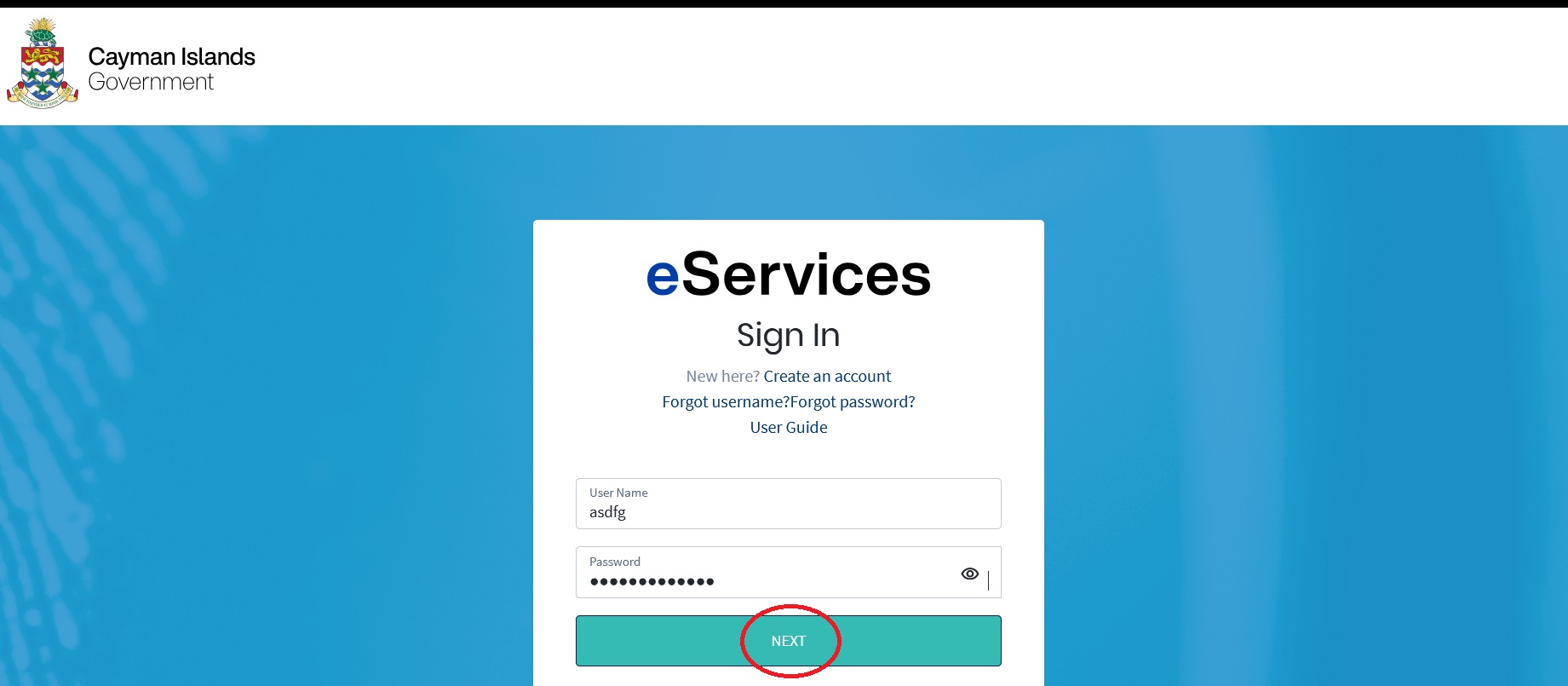
On the Sign In page, enter your username or your email address. Then enter your password. Click the next button to continue. If your username or email matches an account, and you have entered the correct password for that account, then you will be asked to provide a One Time Passcode (OTP). We can send you a One Time Passcode by email to the address registered with your account, or by text message (SMS) to your mobile phone.
Alternatively, you may wish to use an authenticator app to generate your OTPs. Cayman Islands Government publishes an app for Android or iOS, but you may choose to use any standards-based authenticator app.
Once your have provided a correct OTP, you will be asked if you would you like to trust the browser or device that you are using for the next 30 days. If you choose to do so, when you login again you will be prompted for your username and password as usual, but you will not be prompted to enter a One Time Passcode.
This option should not be used on a computer or device that is shared with other people. If you choose to use this option, a “fingerprint” of your browser and device or computer is saved on your account, and a comparison is made every time you sign in. Note that if you use a different browser on the same computer, or if you use an “incognito” or “in private” browser, then “Trust your browser or device” will not work.
What is the Last Date For MOE Cayman Islands ECAP Funding?
Last Date For MOE Cayman Islands Early Childhood Assistance Programme (ECAP) Funding 2025-2026 is 31st March 2026